We remain fully operational. Our teams are working around the clock to ensure your deliveries continue safely.

DOWNLOAD THE APP


Copyright © 2025 Desertcart Holdings Limited
DOWNLOAD THE APP



Buy anything from 5,000+ international stores. One checkout price. No surprise fees. Join 2M+ shoppers on Desertcart.
Desertcart purchases this item on your behalf and handles shipping, customs, and support to Burundi.
Level Up Your Play! 🎮
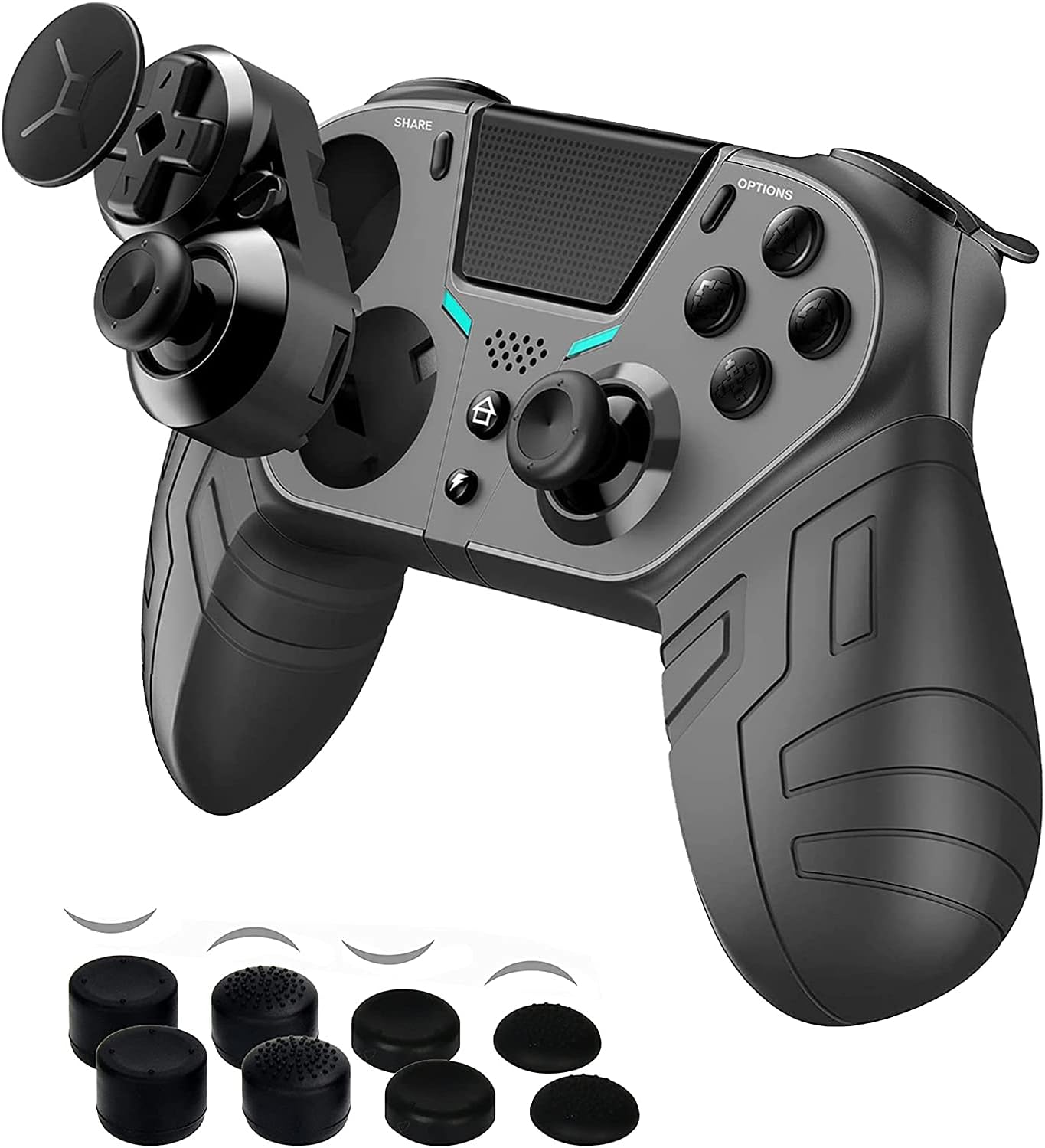
The COWBOX Wireless P4 Controller (2021 Upgraded Version) is a versatile third-party game controller designed for PS4, PC, and mobile devices. It features 16 buttons, including 3 programmable back buttons for customizable gameplay, a sensitivity-control back button for precision aiming, and a clickable touchpad for enhanced interaction. With dual vibration, turbo functions, and a skin-friendly design, this controller is perfect for gamers seeking an edge in their favorite titles.


| ASIN | B097QBFKN1 |
| Additional Features | Wireless |
| Best Sellers Rank | #52,917 in Video Games ( See Top 100 in Video Games ) #297 in PlayStation 4 Headsets #1,164 in PC Game Headsets |
| Brand Name | COWBOX |
| Button Quantity | 16 |
| Color | BLACK |
| Compatible Devices | Android, PC, Playstation 4, Windows |
| Connectivity Technology | Wireless,Usb |
| Controller Type | Gamepad |
| Customer Reviews | 3.8 3.8 out of 5 stars (253) |
| Hardware Platform | Gaming Console, pc |
| Item Weight | 0.33 Kilograms |
| Manufacturer | TJPD |
| Model Name | P4 |
| Package Quantity | 1 |
| Power Source | Battery Powered |
| UPC | 761596891129 |
K**U
A bit of troubleshooting I will go over in this review
I actually physically own the previous version of this controller (green) and, fkr someone who plays a lot of games that involve a lot of coordination, this is definitely the controller you want. The back buttons give your right hand a little more freedom (I use right back two for X/O {PS4} or A/B {XB1} and the top left for L3 Click). It's solid, it's firm, button remap is very simple and easy. HOWEVER!!! The only two dislikes I have about this are that: 1. You can't use the bottom left back button. 2. If you decide to flip the D-PAD and Left Analog, more than likely you WILL have to reset as the left analog will experience slowness in moving along one of its axels. Physically, it works fine. Digitally, one direction will be crazy slow. A simple reset fixes this. I've uploaded a video about it happening, this is the fix: a reset. Also the "aim-slower" button cannot be unmapped or remapped. This should be an option given this is mostly a thing for competitive FPS games. Other than that, I 100% would recommend this to all my friends. Update: It is Dec. 28th, the Micro-USB fornthe charger as somehow broken and will not charge. It was never dropped, it was never handled poorly, my guess is that the Micro port is just poorly set into place because the entire thing now wobbles A LOT, and will no longer charge. I'd like to speak to support about this as I've had this literally barely over a month and it's currently just a paperweight.
N**.
Excellent value for the $$$ once you learn how to use the mapping/turbo features
This is a great controller for the money as it comes with 3 mappable back buttons. Buyer make note that 3 of the 4 back buttons are mappable. The 4th back button can ONLY be used as a sensitivity button to decrease sensitivity by 50% which is handy for first person shooter games like COD, Fortnite...etc You will HATE THIS CONTROLLER if you don't know how to program the features. The instruction manual is very confusing (I have used several controllers with mapping buttons...etc) so I have broken down the programming steps for others to follow. Again, the quality, features, feel, grip, trigger/joystick sensitivity...etc Are all very good and give you ton of options to enhance your gaming experience. I hope this helps... ***How to map back buttons Press turbo (FIRST) and hold, THEN press back button of choice (M1, M2..etc) and hold until light flashes. *Release hold on turbo & back button Then press back button to bind/map (R1, L3, Circle….etc) Then press back button again (M1, M2…etc) Light stops flashing and controller vibrates ***How to turn on/off Turbo Press & hold turbo, then press button you want to enable/disable turbo ex (turbo + R2) ***How to map multiple buttons to single back button (EX: M1 can be R1, then L3, Then Circle) You can set the order in which each button is pressed which is great for quick building & editing binds for fortnite. You can make one back button do a complete edit reset instead of having to push 3 separate buttons FIRST, press turbo and hold, then press & hold back button (M1, M2…etc) until light flashes...release Then press button sequence you want to bind (circle, L3, circle) Then press the original back button you chose (M1,M2...etc) multi button mapping should be complete
B**P
No Instructions
Controller feels great and works well for PS4 use. Does not work for PS3. No instructions were included, which was a bit frustrating.
T**N
Great costumer service
I bought this controller works good but my teammates couldn’t hear me other than that worked good I wrote them about the mic issues they sent me a replacement immediate response from the company got my new controller and it works great and mic works. So the controller is great and the costumer service is even better I would buy another one when the time comes
J**S
Severe Stick drift under five uses
Looks amazing but looks isn't going to help with functionality. I used it one time without stick drift. Very cheaply made too. Become unusable after four.
J**.
Cheap, but you get what you pay for
First thing to keep in mind: I have large hands, so this review may not apply to everyone. The good: the grips feel nice, the sticks can rotate to xbox controller positioning, has great battery life, and comes with decent stick extenders. The bad: the target button on back is perfectly placed, but can't be re-mapped so it is useless. The back-upper buttons dont have comfortable placement, so I keep accidentally hitting the target button instead of M1. One of the screws for rotating the controls was stuck and broke when I was trying to get it out (the first turned with no problems). Setup was a pain, the instructions are very unclear. This would get 4 stars if the target button could be remapped and the screw didn't break the first time I opened it up. 5 if the setup wasn't such a headache.
T**.
Analog drift & headphone jack fails.
Terrible controller it fails in most aspects of getting to actually play and talk with anybody. Controller drift immediately & headphone jack on both controllers failed very fast after use.
K**L
Best controller for war zone
The controller is awesome great grips and analog sticks but the extra covers are horrible and control freaks don't fit. I play a lot of war zone and its perfect without them. Great movement and response time.
M**N
Sometimes it turns off out of nowhere but other than that it’s been a really good ,the round stick grips that come with it also are my favourite
R**L
El control simplemente es genial para jugar fortnite o minecraft en pc o android
E**O
Su versatilidad es buena para el cambio de posición del joystick, pero estos mismos se traban y la entrada de audífonos no reconoce los audífonos con micrófono integrado
G**O
No complaints from the kids
S**H
The product didn't work, and i'm past the return date. Don't buy.
Trustpilot
1 month ago
1 month ago